AWS ECS Deployment: Planning your Deployment
Last updated: September 9, 2026
Kion can be installed in the following AWS environments:
- AWS Commercial
- AWS GovCloud
- AWS SC2S
Considerations
This deployment method is intended for environments that require ECS-based deployments. This deployment method is an advanced configuration of Kion. The following things should be considered in determining whether or not an ECS-based deployment is right for your environment:
- ECS deployments of Kion may have an increased AWS resource costs when compared to EC2 deployments.
- ECS deployments require some knowledge and familiarity with ECS to properly analyze and maintain the environment.
- ECS Fargate requires scaling of each individual microservice. This increases the complexity of scaling but offers the benefit of being able to directly scale individual service.
Database Instances and Application Nodes
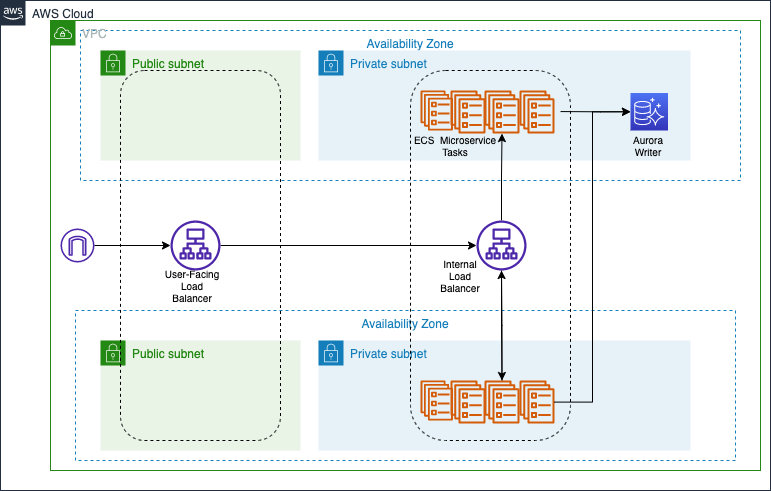
Standard Deployment
A standard deployment consists of 2 or more application nodes across 2 or more availability zones with a single database instance in the cluster. This provides you with zero-downtime upgrades.
A potential drawback comes from the database cluster only having one instance. If there is an availability zone failure in AWS, no data loss will occur, but it may take up to 15 minutes for AWS to automatically launch a new instance in a different (or stable) availability zone.
High Availability Deployment
A high availability deployment consists of 2 or more application nodes across 2 or more availability zones with a writable database instance and a read-only database instance in the cluster.
Requirements
We recommend installing Kion in a separate, dedicated AWS account, since the Kion service-account role in that AWS account will have permissions to access all of your managed AWS accounts. The Kion service-account role will have the AdministratorAccess IAM policy attached. You can choose to limit this access, but it will impact how effectively Kion can manage accounts.
Note: We recommend installing Kion in a separate, dedicated AWS account. We do not recommend installing into the management account.
The user that deploys Kion must have access to an AWS account with permissions to create and use:
- ECS Clusters
- ECS Services
- ECS Task Definitions
- Elastic Load Balancers
- Security Groups
- Amazon Aurora MySQL database instances
- KMS keys
- IAM roles
- IAM users
- CloudWatch log Groups (optional)
Networking
You can create a new VPC or use an existing VPC. We recommend using 6 subnets: 3 private subnets in different availability zones that route to a NAT and 3 public subnets in matching availability zones that route to an internet gateway. To accommodate our load balancers, the subnets cannot be smaller than /27.
Internet access is not required for installation, but installation requires access to:
- A Docker image repository. An AWS elastic container repository is preferred, since all access can be managed via AWS services. By default, this is a Kion-managed repository.
- S3.
- S3 Gateway endpoint.
- ECR interface endpoints for
com.amazonaws.<region>.ecr.dkrandcom.amazonaws.<region>.ecr.api. - STS interface endpoint for
com.amazonaws.<region>.sts. - If you are using Cloudwatch Logs, Cloudwatch Logs interface endpoint for
com.amazonaws.<region>.logs. - EC2 - This endpoint is needed for critical operations such as region detections.
- ELB - This endpoint is needed for installation in order to evaluate the status of the ELB and validate node health.
- CloudFormation - This endpoint is needed to support signaling to the CloudFormation stacks regarding the health of a node.
- STS - This endpoint is needed for many of the critical operations that Kion performs including federation into the AWS console and assuming the application’s service role.
Note: If you need to set up a new VPC, we provide a CloudFormation template you can use in the next article. It sets up three public subnets, three private subnets, and one NAT gateway.
DNS and HTTPS
Interface endpoints require that the VPC used to install Kion has DNS support enabled.
To serve Kion under a custom domain name, enter the desired name in the App Stack in the Domain Name parameter. Once the stack is deployed, the Outputs tab will show the AWS-generated DNS name of the user-facing load balancer. Create a CNAME record in your Organization's DNS zone that points the AWS-generated name to the desired domain name.
To use HTTPS (recommended), ensure a valid certificate is available in ACM, and that it contains the desired domain name for Kion as one of the Subject Names in the certificate. The ARN will be required when configuring the kion-app CloudFormation template.
Security Policies
If you have any AWS Service Control Policies (SCPs) applied to the account where Kion will be installed, ensure they won’t interfere with the creation of the following resource types:
- ECS Clusters
- ECS Services
- ECS Task Definitions
- Elastic Load Balancers
- Security Groups
- Amazon Aurora MySQL instances
- KMS keys
- IAM roles
- IAM users
- Lambda functions
- (Optional) CloudWatch log Groups
AWS Service Limits
There are a few Kion features that may require increases in AWS service limits. Those service limits are:
- Number of AWS accounts that can be created via Organizations
- Number of IAM policies per IAM role
To increase service limits, you must request the increase in your AWS organization’s management account.
To increase the service limit for the number of AWS accounts that can be created via Organizations:
- Open the Amazon Support console.
- Click Create case.
- Select Looking for service quota increases?
- For the Limit type, select Organizations.
- For the Limit, select Number of Account.
- Enter in a new limit value.
- Enter a description stating why you need to create the AWS accounts.
- Click Submit.
To increase the service limit for the number of IAM policies per IAM role:
- Open the Amazon Support console.
- Click Create case.
- Select Looking for service quota increases?
- For the Limit type, select IAM Groups and Users.
- For the Limit, select Policies Per Role.
- Enter in a new limit value above 10.
- Enter a description stating why you need the additional policy allowances.
- Click Submit.
Integration Points
Kion has a full-featured, public API that for automating many actions within the application. All public endpoints and their usage can be found at the /swagger URL of your Kion instance. You can read more about the API in our article OpenAPI Swagger Documentation.
Kion also has a feature called Webhooks, which allow Kion to reach out to external services when specific events occur. You can read more about webhooks in our article Using Webhooks.
Deployment Options
- AWS ECS Deployment: Standard Deployment
- AWS ECS Deployment: Air-Gapped Deployment
- AWS ECS Deployment: SC2S Deployment
