What is a Compliance Check?
Last updated: October 22, 2026
A compliance check performs an analysis on a cloud resource to see if it matches an undesirable configuration. You would typically use these checks to find resources with insecure configurations. For example, you could have a check for whether an S3 bucket is configured as publicly accessible.
There are four different types of checks:
Cloud Custodian. Kion includes the open-source Cloud Custodian rules engine, which allows you to easily write and run YAML policies against your cloud resources.
Azure Policy Check. You can add Azure policy definitions to Kion with JSON policy code specifically configured to check for compliance in your Azure resources.
External. Kion also supports ingesting data from external tools. Compliance checks serve as metadata for those external checks as well.
Tenable.sc Integration. A compliance check that integrates with Tenable.sc compliance middleware.
To get you started, there are 100s of Cloud Custodian compliance checks available in your environment. We also provide easy-to-import, pre-made collections of compliance checks for many compliance frameworks. For more information, see Managed Resources & Compliance Jumpstarts.
Note: Compliance in Kion is made up of three pieces: compliance standards, compliance checks, and compliance findings.
Standards group together related checks to meet larger compliance goals, guidelines, or requirements.
Checks contain definitions for compliance that findings are based on.
Findings identify specific resources that are not compliant. Findings cannot exist without checks, because checks define what is and isn't compliant. A check questions if a resource is compliant, and a finding is the answer to that question.
Compliance Check Status
A check is considered compliant if it has been scanned recently, is not part of a failed scan, and has no active findings.
A check is considered non-compliant if it has at least one active finding. Non-compliant checks can also have states of current, pending, or failed to run (suspended).
A current, non-compliant check has been scanned recently and has at least one active finding. This is the default state of non-compliant checks and is not specifically marked with a badge in the Kion console.
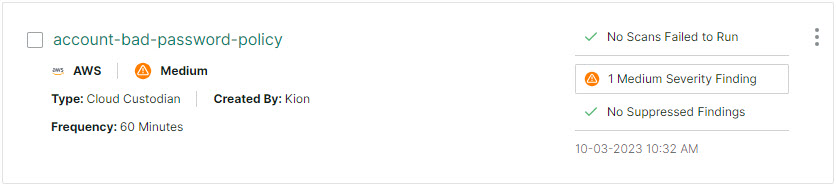
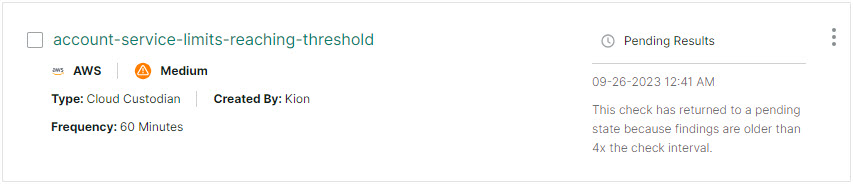
A pending check has not been scanned recently or has never been scanned. In this case, the check is considered non-compliant, because we don't have recent data on it. This can result from a connection issue, the check may be in the queue, or it may be because the check is new and simply hasn't been run yet.
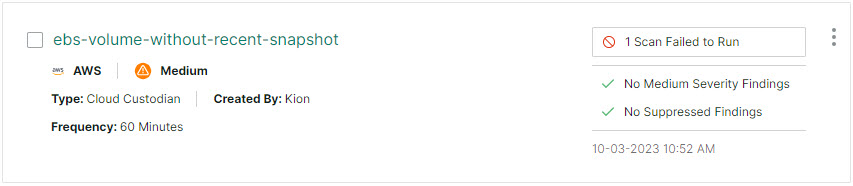
A failed or suspended check has failed to scan in at least one account/region 3 times. Checks that are failed/suspended are no longer scanned until a remediation action is taken.
A check is considered inactive if it is not included in any compliance standards.
Demonstration
What next?
Take a look at our pre-made collections of compliance checks. All of these checks and standards come ready to be applied to resources. For more information, see Managed Resources & Compliance Jumpstarts.
In addition to our out of the box checks, you can create your own compliance checks to fit your specific needs. For more information, see Add a Compliance Check.
Compliance checks are applied through compliance standards. To add compliance checks to compliance standards, see Add a Compliance Standard.
You can learn more about how to write compliance policies in the Writing Cloud Custodian Compliance Policies and Using Azure Policies to Monitor Compliance articles.